
If you haven’t already heard of Ransomware, you’re in the minority, particularly considering how much the practise increased during 2016. Briefly, Ransomware is a type of malware virus that locks down your computer files and demands a ransom, usually in the digital currency, Bitcoin, to unlock them.
According to IBM, 46% of executives it surveyed have been affected by Ransomware, with 70% of those paying the ransom to get control of their computer back. And, while Ransomware might be more common among businesses, it occurs on a personal level too.
Related Reading-
Related Reading-
Ransomware Data Recovery in Brisbane, Sydney, Melbourne, Adelaide, Darwin, and Perth
How to Handle a Ransomware Attack
First and foremost, the best thing to do is to regularly back up your PC to an external hard drive that is physically separate from your computer. That way, if you’re unfortunate enough to be targeted by Ransomware racketeers, you can wipe the hard drive then replace it with your saved one.
The practise of backing up an office full of PCs might sound like a potentially expensive business, but the cost of external data storage has come down a lot in recent years. And, even if it hadn’t, the cost of data storage would still far outweigh any ransom you might have to pay following a ransomware attack.
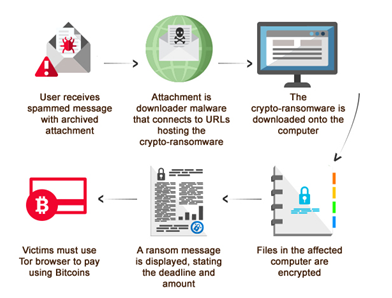
Of course, having the ability to foil the criminals, get back to work quickly and without damage doesn’t stop the inconvenience of ransomware attacks. And, if you don’t regularly back up your PC or, if you need to rely on the backed-up data and find the back-up hasn’t worked properly, then you’ll find yourself in a bit of a tight spot. But, this is not the time to panic, give into the criminals and pay them. Nor is it the time to rely on free downloadable software. Why? Because:
a) The criminals might not release your PC even if you do pay.
b) This makes you a future target who can be relied upon to pay up when threatened.
c) Any program you download could do additional damage to your PC, even if in the unlikely event it actually works.
The best thing to do, as with most things when it comes to fixing a technical or digital problem with your PC, is to contact the experts. The reason is pretty simple, it’s our business to know about all things digital in order to do our job properly. And for us at Brisbane Data Recovery, that’s something we take very seriously.
Seek Advice from Computer Experts
While the length of time your PC is locked by Ransomware doesn’t really matter when it comes to removing the virus, it’s likely important to you. That means you should give us a call as soon as you can. Expert computer technicians can then find out exactly what’s happened and will know the best solution.
Of course, it’s likely to involve a trip to your local PC workshop. But if that means you can get your laptop back without paying off cyber criminals, then that’s got to be a better option than potentially damaging your PC with software you’re unsure of.
If you’d prefer to avoid a trip to your local data recovery technician, its worth looking into external hard drives and data storage. Indeed, with Ransomware attacks expected to increase in 2017, it’s something that you shouldn’t have to think twice about arranging.
If you need advice on this, our digital experts can help you. As well as putting your mind at ease that you’re doing all you can to protect your PC, you’re also getting to know and trust an expert. An expert who will be able to help you further if something goes wrong with your PC in the future. Are you looking for Best Computer Repairs in Brisbane? Super IT Solutions is the best On-site IT support provider.


