Showing posts with label software. Show all posts

Wednesday, 5 July 2017

Encrypted Messaging and Now, Encrypted Calls

With easier access to a variety of forms of encrypted messaging, why aren’t there more options for making encrypted voice and video calls? Well, first off, let’s start by saying there’s a lot more choice than there was, say ten years ago.
WhatsApp, Skype, Google Hangouts and FaceTime all provide encrypted, secure voice and/or video calls – provided both parties are using the same system. What isn’t widely available is the simple and reliable ability to ensure your conversation is secure from prying ears, if you’re calling someone on their land line, from your cell phone.

The Difficulties

The reason that it’s easier for companies to keep encrypted call services in house is because making video and internet calls is a pretty big challenge in itself. Once they’ve found a system that works, the process of making changes to work with other providers – that could limit both the call and secure ability – could mean a surge in development time and costs.
It would also mean they’re sharing the positive results of all their investment with other companies, for free! That might not seem like a particularly difficulty to the end user. But, believe us when we say research & development investment levels can be very high for tech companies, so they aren’t often inclined to share the fruits of their hard work and high spend.


Encryption Services Growing

Despite the difficulties around creating, providing and supporting encrypted phone and video calls, the number of providers is growing. Just recently, messaging service the TelegramApp, has begun to offer secure calls across Australia.
You can also purchase devices that are designed to make your calls secure – but they’re rarely cheap. Cryptophones are another option – but again, you can only use one to call another Cryptophone.
This shows that more tech businesses understand the importance of not getting left behind and providing the services that people want to use. But right now, most of those businesses seem content with offering those secure calls in a closed environment.

Why Encryption Services are Important

Of course, in an ideal world we wouldn’t need encryption services, because no-one would want or be able to listen in. But, they do and can and that includes Governments around the world, as well as cyber criminals and businesses trying to sell anything and everything to us.
Sure, most of us aren’t doing anything we shouldn’t in our day-to-day life. But, that doesn’t mean weshould forgo our privacy and let anyone who can or claims they have the authority, to actually do it. By having easy access to encrypted and secure messaging and phone and video calls, we’re protecting our own right to privacy.


Luckily, this is something tech companies understand, which is why more easily accessible encrypted calls across multiple providers and app is likely to be a possibility, at some point in the future.

Tuesday, 4 April 2017

Protect Your PC from the Rise of Ransomware

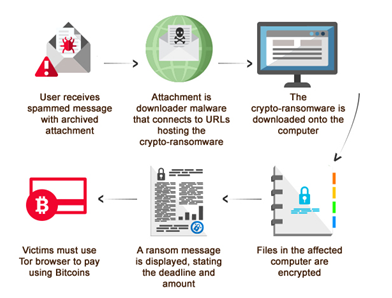
If you haven’t already heard of Ransomware, you’re in the minority, particularly considering how much the practise increased during 2016. Briefly, Ransomware is a type of malware virus that locks down your computer files and demands a ransom, usually in the digital currency, Bitcoin, to unlock them.
According to IBM, 46% of executives it surveyed have been affected by Ransomware, with 70% of those paying the ransom to get control of their computer back. And, while Ransomware might be more common among businesses, it occurs on a personal level too.

Related Reading- 

Ransomware Data Recovery in Brisbane, Sydney, Melbourne, Adelaide, Darwin, and Perth


How to Handle a Ransomware Attack
First and foremost, the best thing to do is to regularly back up your PC to an external hard drive that is physically separate from your computer. That way, if you’re unfortunate enough to be targeted by Ransomware racketeers, you can wipe the hard drive then replace it with your saved one.
The practise of backing up an office full of PCs might sound like a potentially expensive business, but the cost of external data storage has come down a lot in recent years. And, even if it hadn’t, the cost of data storage would still far outweigh any ransom you might have to pay following a ransomware attack.
Ransomware Process

Of course, having the ability to foil the criminals, get back to work quickly and without damage doesn’t stop the inconvenience of ransomware attacks. And, if you don’t regularly back up your PC or, if you need to rely on the backed-up data and find the back-up hasn’t worked properly, then you’ll find yourself in a bit of a tight spot. But, this is not the time to panic, give into the criminals and pay them. Nor is it the time to rely on free downloadable software. Why? Because:
      a)      The criminals might not release your PC even if you do pay.
      b)      This makes you a future target who can be relied upon to pay up when threatened.
      c)       Any program you download could do additional damage to your PC, even if in the unlikely event it actually works.
The best thing to do, as with most things when it comes to fixing a technical or digital problem with your PC, is to contact the experts. The reason is pretty simple, it’s our business to know about all things digital in order to do our job properly. And for us at Brisbane Data Recovery, that’s something we take very seriously.
Seek Advice from Computer Experts
While the length of time your PC is locked by Ransomware doesn’t really matter when it comes to removing the virus, it’s likely important to you. That means you should give us a call as soon as you can. Expert computer technicians can then find out exactly what’s happened and will know the best solution.
Of course, it’s likely to involve a trip to your local PC workshop. But if that means you can get your laptop back without paying off cyber criminals, then that’s got to be a better option than potentially damaging your PC with software you’re unsure of.
If you’d prefer to avoid a trip to your local data recovery technician, its worth looking into external hard drives and data storage. Indeed, with Ransomware attacks expected to increase in 2017, it’s something that you shouldn’t have to think twice about arranging.
If you need advice on this, our digital experts can help you. As well as putting your mind at ease that you’re doing all you can to protect your PC, you’re also getting to know and trust an expert. An expert who will be able to help you further if something goes wrong with your PC in the future. Are you looking for Best Computer Repairs in Brisbane? Super IT Solutions is the best On-site IT support provider.


Tuesday, 28 February 2017

When is Do-It-Yourself Data Recovery Worth the Risk? (Updated)

When it comes to retrieving deleted data from your laptop or PC, we know that sometimes, through no fault of your own, you’re looking at paying out, to get that data back. Some of you may feel confident enough of your technical skills to attempt using online software to recover that lost information yourself for a lower cost. And, in some, lucky cases this might work. But, the times where no damage at all was made to your laptop or PC was made in these instances, are few and far between.
If you’re reading this post, you might be considering doing the very thing we’re warning you against. If you are, or even if you’re just feeling intrigued and want to log this information for the future, read on.

Data Recovery DIY

How Was the Data Lost?


There are a number of ways in which files and data can be lost. They include:
  •      Human error/deletion.
  •      Physical damage to the drive.
  •     Unexpected glitch where the data is        nowhere to be found (by you, at least.)
  •     An update has wiped that data or file section, unexpectedly.

In all of these situations, an expert has a much greater chance of finding what you need, without damaging your computer. Using do-it-your self software, however, doesn’t. And Here’s why. If you’ve deleted the data or files, they will remain on your laptop or PC for a while – until they’re over-written by app updates or a new program - LIKE THE ONE YOU’VE JUST DOWNLOADED. Right there is the first and arguably, biggest risk of doing this yourself.

If an update has moved or seems to have wiped the data you need, you’re in a similar situation to the one above. So, while the data is probably still on there, the change likely renders it as unwanted, which leaves it open to being over-written.
software, do-it-yourself, laptop, computer, lost, recover, expert
If the machine has been dropped, cracked or damaged in some way, then the software you’ve just bought and downloaded, simply won’t be equipped for the job. That’s because they are designed to navigate through machines that are in correct working order. If you use them on a damaged machine, they can’t work in the way they should which means, unless you’re incredibly lucky, they won’t work and can potentially damage other files in the process.

The Cost of Professional Data Recovery is Worth Every Penny

If the data or files you’ve lost are worth something to you in monetary terms, it suggests you really need them found. If that’s the case, why are you even considering a do-it-yourself option that has a real possibility of failing and causing more damage?
If, however, the files aren’t all that valuable but you still want them, we’re afraid the same applies – is it worth the risk of saving a little money to get back something that’s personally important?

Of course, because we are data recovery experts, we know how to get our files back, so we are confident when we tell you our service is great value for money. Our experience and expertise means we know where to look for your data, in a way that doesn’t damage your laptop or PC. If you have to put a price on the data you’ve lost, we think our fixed price fees might surprise you and make the choice to use our services pretty simple! 
Recommendation: 
Best Computer Repairs in Melbourne